> For the complete documentation index, see [llms.txt](https://feesaver.gitbook.io/docs/llms.txt). Markdown versions of documentation pages are available by appending `.md` to page URLs; this page is available as [Markdown](https://feesaver.gitbook.io/docs/feesaver/address-activation.md).
# Address activation
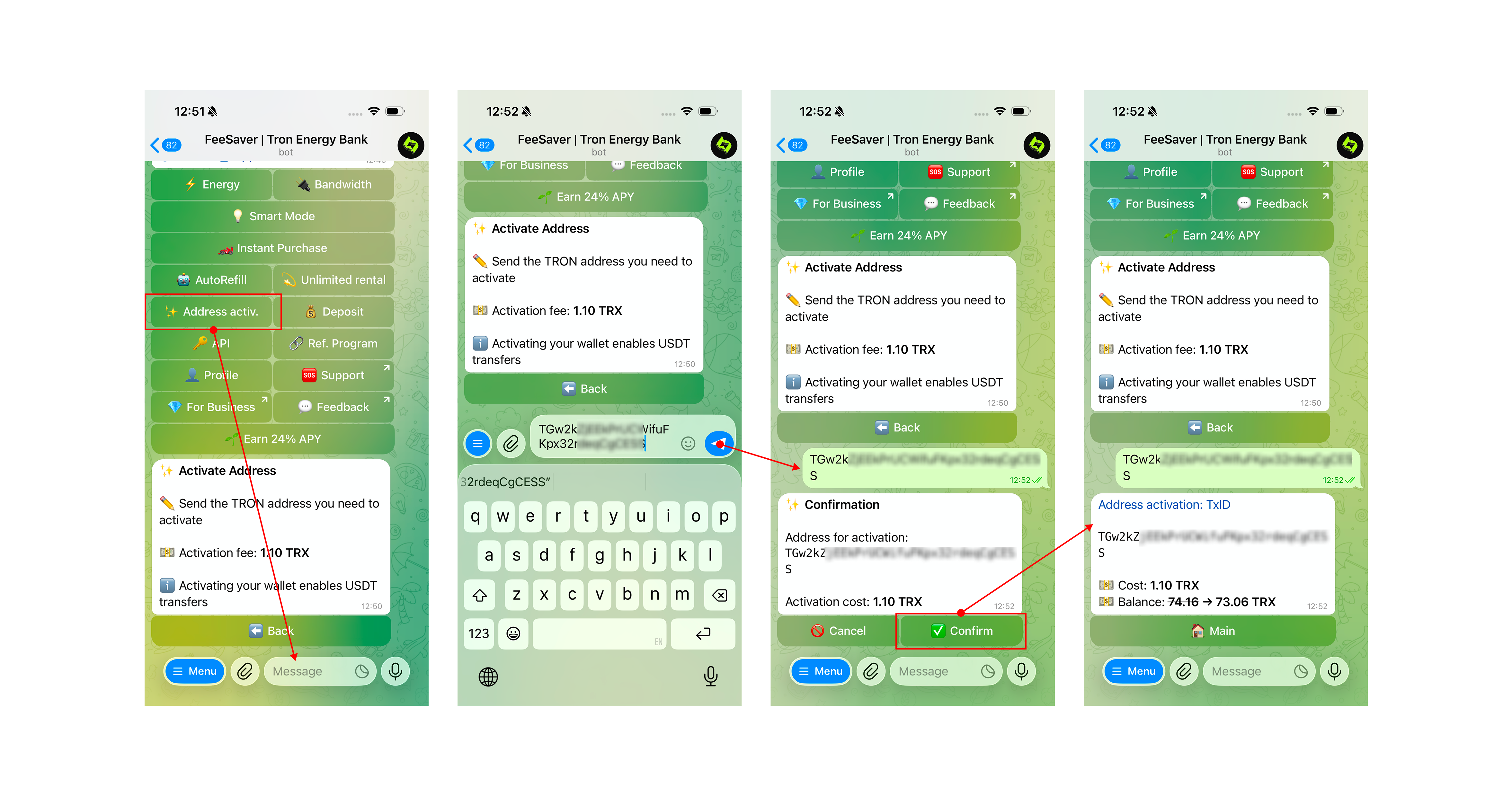
Company offers a convenient address activation in the bot [@FeeSaver\_bot](https://t.me/feesaver_bot). Detailed step-by-step instructions:
### Step 1: Go to the bot menu and select Energy
1. Go to the bot [t.me/FeeSaver\_bot](https://t.me/FeeSaver_bot) and press the button **/start**
2. In the menu you will see balance information, make sure it is sufficient
3. Press the button **⚡️ Address activ.**
After that your address will be activated and can be used to its full extent
***
Any questions left? Write to our support service [t.me/feesaver\_support](https://t.me/feesaver_support)